What Is System Design? A Practical Guide to Building Scalable Software
Writing a function that works is one thing. Designing a system that keeps working under real traffic, real failures, and real growth is a different skill entirely.
System design is the discipline of planning how the components of a software system fit together — how data flows, where it's stored, how services communicate, and how the whole thing holds up as usage grows.
It's not a single technology or framework. It's a way of thinking about trade-offs before a single line of code gets written.
What Is System Design?
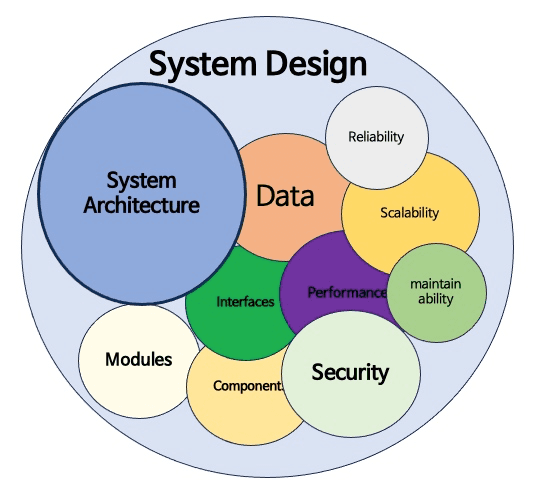
System design is the process of defining the architecture, components, modules, interfaces, and data flow of a system to satisfy specified requirements.
At a small scale, this might mean deciding how a frontend talks to a backend and where data gets stored:
Client → API → Database
At a larger scale, it means deciding how to handle millions of users, distribute data across regions, keep the system available when parts of it fail, and let different teams work on different pieces without stepping on each other:
Client
  ↓
CDN
  ↓
Load Balancer
  ↓
API Gateway
  ↓
Microservices
  ├── Auth Service
  ├── User Service
  ├── Payment Service
  └── Notification Service
        ↓
   Databases + Caches + Queues
System design asks: given these requirements and constraints, what's the best way to structure this system? There's rarely one correct answer — only better and worse trade-offs for a given situation.
Why System Design Matters
A system that works for 100 users can fall over completely at 100,000. The difference usually isn't the code quality of individual functions — it's the architecture underneath them.
Poor system design shows up as:
- Slow response times as traffic grows
- Services that go down when one dependency fails
- Databases that can't keep up with read or write load
- Systems that are painful to change or extend
- Outages that cascade from one small failure
Good system design anticipates these problems before they happen, rather than patching them after an outage.
Functional vs Non-Functional Requirements
Before designing anything, you need to separate what the system must do from how well it needs to do it.
Functional requirements describe specific behavior — a user can sign up, a customer can place an order, a video can be uploaded and played back.
Non-functional requirements describe the qualities the system needs, such as:
- Scalability — can it handle growth in users or data?
- Availability — does it stay up when things go wrong?
- Latency — how fast does it respond?
- Consistency — do all users see the same data at the same time?
- Durability — can data survive failures without being lost?
- Security — is data and access properly protected?
Most system design decisions come down to balancing these non-functional requirements against each other — you rarely get to maximize all of them at once.
Scaling: Vertical vs Horizontal
When a single server can't handle the load anymore, there are two broad directions to go.
Vertical scaling means adding more resources to a single machine — more CPU, more RAM, faster storage:
Server (small)
   ↓
Server (bigger)
It's simple, but it has a ceiling — eventually one machine can't get any bigger, and it's also a single point of failure.
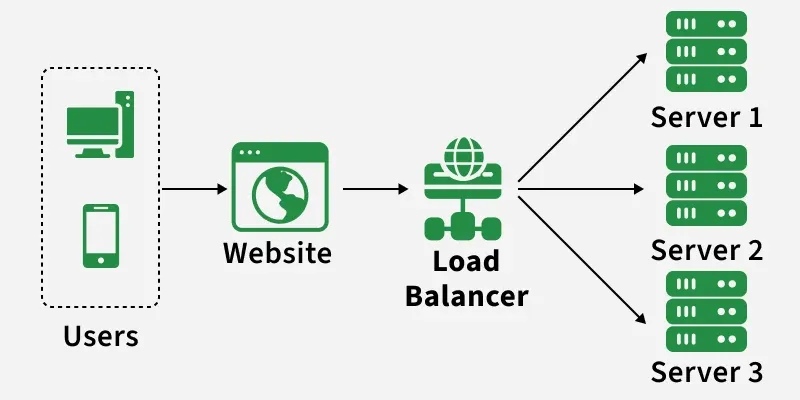
Horizontal scaling means adding more machines and distributing the load across them:
Load Balancer
      ↓
Server 1 · Server 2 · Server 3
This scales further and improves fault tolerance, but it introduces new complexity — coordinating state across servers, keeping data consistent, and routing requests correctly.
Most large-scale systems eventually need horizontal scaling, even if they start out vertically scaled for simplicity.
Load Balancing
A load balancer sits in front of multiple servers and distributes incoming requests so no single server gets overwhelmed:
Client
  ↓
Load Balancer
  ↓
Server A · Server B · Server C
This is one of the most fundamental building blocks in scalable system design — without it, horizontal scaling doesn't work, because there's no way to spread traffic across the added servers.
Caching
Caching stores frequently accessed data somewhere faster than the original source, so repeated requests don't have to hit a slow database or expensive computation every time.
Request
  ↓
Cache?
  ├── Hit  → Return cached data
  └── Miss → Fetch from source → Store in cache → Return
Common caching layers include in-memory stores like Redis or Memcached, CDN caching for static assets, and browser-level caching.
Caching is one of the highest-leverage tools in system design, but it introduces its own problem: cache invalidation — knowing when cached data has gone stale and needs to be refreshed.
Databases: SQL vs NoSQL
Choosing the right database is one of the biggest system design decisions, and it depends heavily on the data's shape and access patterns.
SQL (relational) databases — PostgreSQL, MySQL — enforce structured schemas, support complex queries and joins, and provide strong consistency guarantees. They fit well when data is relational and consistency matters, like financial systems or order management.
NoSQL databases — MongoDB, Cassandra, DynamoDB — trade some structure and consistency guarantees for flexibility and horizontal scalability. They fit well for large-scale, loosely structured data like user activity logs or product catalogs.
Neither is universally better. The right choice depends on your data model, query patterns, consistency requirements, and scale.
Database Scaling: Replication and Sharding
As a single database reaches its limits, two common strategies help it scale further.
Replication copies data across multiple database instances:
Primary Database (writes)
      ↓
Replica 1 · Replica 2 (reads)
This distributes read load and provides redundancy if the primary fails, though it introduces questions about replication lag and consistency between replicas.
Sharding splits data across multiple databases based on some key, so no single database holds all the data:
User ID 1-1000    → Shard A
User ID 1001-2000 → Shard B
User ID 2001-3000 → Shard C
Sharding lets a database scale beyond what a single machine can hold, but it adds real complexity — queries that span shards, rebalancing when a shard gets too big, and maintaining consistency across shards.
Message Queues and Asynchronous Processing
Not every operation needs to happen immediately in response to a request. Message queues let you defer work to be processed later, independently of the original request:
Request
  ↓
API
  ↓
Queue
  ↓
Worker (processes asynchronously)
Common tools include Kafka, RabbitMQ, and cloud-native queue services.
This pattern is useful for sending emails, processing images or video, generating reports, or any task that doesn't need to block the user's response. It also decouples services from each other — if a downstream service is slow or temporarily down, work waits in the queue instead of failing outright.
Content Delivery Networks (CDNs)
A CDN caches static content — images, videos, JavaScript, CSS — at servers distributed geographically closer to users:
User (Nairobi)
  ↓
Nearby CDN Edge Server
  ↓
(Origin Server, only if not cached)
This reduces latency for users far from your origin server and reduces load on your core infrastructure. It's one of the simplest, highest-impact optimizations for any system serving static assets to a geographically spread-out audience.
Consistency and the CAP Theorem
In distributed systems, there's a fundamental trade-off known as the CAP theorem: a distributed system can only guarantee two of the following three at once — Consistency, Availability, and Partition tolerance.
Since network partitions are a fact of life in distributed systems, the real-world choice usually comes down to consistency versus availability when a partition happens:
- Choose consistency — the system may become temporarily unavailable rather than return stale or conflicting data. Important for things like financial transactions.
- Choose availability — the system keeps responding, but different nodes might briefly disagree on the current state. Acceptable for things like social media feeds or product recommendations.
Understanding this trade-off is central to designing any distributed system — there's no configuration that avoids the trade-off entirely.
Microservices vs Monoliths
Another major architectural decision is whether to build one unified application or split functionality into independent services.
A monolith keeps all functionality in a single codebase and deployment unit:
Single Application
 ├── Auth
 ├── Users
 ├── Orders
 └── Payments
It's simpler to develop, test, and deploy early on, but it can become harder to scale specific parts independently or let large teams work without conflicts as it grows.
Microservices split functionality into independently deployable services:
API Gateway
 ├── Auth Service
 ├── User Service
 ├── Order Service
 └── Payment Service
This allows independent scaling, deployment, and team ownership of each piece — but it introduces real complexity around service communication, distributed transactions, monitoring, and debugging across service boundaries.
Many successful systems start as monoliths and split into microservices only once the complexity actually justifies it — starting with microservices too early is a common and costly mistake.
Designing for Failure
A core principle of system design is that failure is inevitable, not exceptional. Servers crash, networks partition, dependencies time out. A well-designed system anticipates this rather than assuming everything will work.
Useful patterns include:
- Redundancy — multiple instances of critical components, so one failure doesn't take down the system.
- Circuit breakers — stop calling a failing service repeatedly, and fail fast instead of piling up requests behind a broken dependency.
- Retries with backoff — retry failed operations, but with increasing delays to avoid overwhelming a struggling service.
- Graceful degradation — keep core functionality working even if a non-critical feature fails.
- Health checks — continuously monitor whether components are actually working, not just running.
A system that fails gracefully is far more valuable than one that works perfectly under ideal conditions and collapses under any deviation.
A Practical Framework for Approaching System Design
Whether you're designing a real production system or working through a system design interview, a consistent process helps:
1. Clarify requirements
      ↓
2. Estimate scale (users, requests, data)
      ↓
3. Define the high-level architecture
      ↓
4. Design the data model
      ↓
5. Identify bottlenecks
      ↓
6. Add scaling solutions (caching, load balancing, sharding)
      ↓
7. Address failure scenarios
      ↓
8. Discuss trade-offs
Step 1 matters more than it looks. Jumping straight to architecture without understanding the actual requirements — read-heavy or write-heavy, how much data, how many users, what latency is acceptable — leads to over-engineered or under-engineered designs that solve the wrong problem.
Common System Design Mistakes
Over-engineering too early. Adding microservices, sharding, and complex caching layers for a system with a thousand users solves problems you don't have yet, at the cost of real complexity you do have.
Ignoring data access patterns. Choosing a database or caching strategy without understanding whether the workload is read-heavy or write-heavy, and how data is actually queried.
Treating the CAP theorem as optional. Every distributed system makes this trade-off whether or not the team acknowledges it — better to make the choice explicitly than have it made by default under failure conditions.
Designing without failure in mind. A design that only works when everything succeeds isn't really a complete design.
Optimizing prematurely. Solving performance problems that don't exist yet, instead of building something correct and measuring where the real bottlenecks are first.
System Design in the AI Era
AI tools can now generate architecture diagrams, suggest database schemas, and even scaffold entire systems from a description. That doesn't reduce the importance of system design — it shifts where the skill gets applied.
An AI can propose an architecture quickly. It still takes engineering judgment to evaluate whether that architecture fits your actual requirements, scale, team size, and constraints. Understanding system design principles is what lets you evaluate AI-generated architecture instead of accepting it uncritically.
Frequently Asked Questions
Is system design only for senior engineers?
No, though it's often associated with senior roles because experience with real production failures teaches many of its lessons directly. Learning the fundamentals early — even before you've built anything at scale — makes you a stronger engineer sooner.
Do I need to memorize every technology to learn system design?
No. The underlying principles — trade-offs, scaling, consistency, failure handling — transfer across technologies. Specific tools change; the reasoning behind choosing them doesn't.
How is system design different from software architecture?
They overlap significantly. System design often refers more broadly to designing an entire system's components and their interactions, including infrastructure-level decisions, while software architecture can also refer to the internal structure of a single application. In practice, many engineers use the terms interchangeably.
What's the best way to practice system design?
Study real systems you use every day and think through how they might be built. Design mock systems — a URL shortener, a chat application, a ride-sharing service — from requirements to architecture. Read post-mortems and engineering blogs from companies that operate at scale.
Conclusion
System design isn't about memorizing a list of technologies — it's about developing the judgment to make good trade-offs given a specific set of requirements and constraints.
Every decision, from choosing a database to deciding between a monolith and microservices, involves balancing competing priorities: speed versus consistency, simplicity versus flexibility, cost versus performance.
The engineers who get good at system design aren't the ones who know the most acronyms. They're the ones who can look at a set of requirements and reason clearly about what the system actually needs — and what it doesn't.